Structured Outputs
Siraya AI supports structured outputs for compatible models, ensuring responses follow a specific schema format. This feature is particularly useful when you need consistent, well-formatted responses that can be reliably parsed by your application.
Structured outputs allow you to:
- Enforce specific JSON Schema validation on model responses
- Get consistent, type-safe outputs
- Avoid parsing errors and hallucinated fields
- Simplify response handling in your application
Model Support
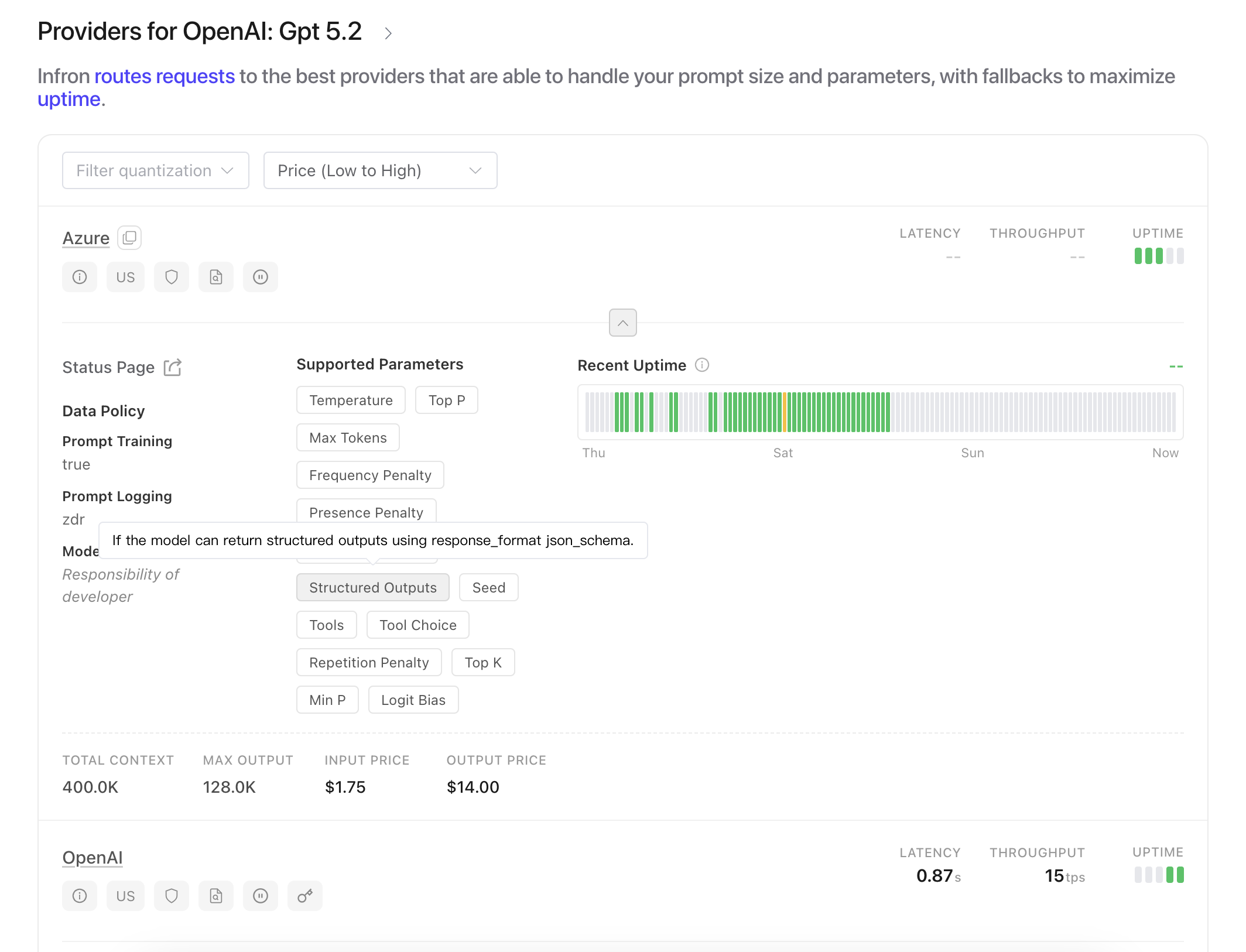
To ensure your chosen model supports structured outputs:
- Check the model's supported parameters on the models page
- Include
response_formatand settype: json_schemain the required parameters
Using Structured Outputs
To use structured outputs, include a response_format parameter in your request, with type set to json_schema and the json_schema object containing your schema:
json_scheme
import requests
import json

response = requests.post(
  url="https://llm.siraya.pro/v1/chat/completions",
  headers={
    "Authorization": "Bearer <API KEY>",
    "Content-Type": "application/json"
  },
  data=json.dumps({
    "model": "openai/gpt-5.2",
    "messages": [
      {"role": "user", "content": "What's the weather like in London?"}
    ],
    "response_format": {
      "type": "json_schema",
      "json_schema": {
        "name": "weather",
        "strict": True,
        "schema": {
          "type": "object",
          "properties": {
            "location": {
              "type": "string",
              "description": "City or location name"
            },
            "temperature": {
              "type": "number",
              "description": "Temperature in Celsius"
            },
            "conditions": {
              "type": "string",
              "description": "Weather conditions description"
            }
          },
          "required": ["location", "temperature", "conditions"],
          "additionalProperties": False
        }
      }
    }
  })
)
print(response.json()["choices"][0]["message"]["content"])
The model will respond with a JSON object that strictly follows your schema:
{
    "conditions": "Overcast with light rain showers",
    "location": "London, United Kingdom",
    "temperature": 12.5
}
CalendarEvent
import requests
import json

response = requests.post(
  url="https://llm.siraya.pro/v1/chat/completions",
  headers={
    "Authorization": "Bearer <API KEY>",
    "Content-Type": "application/json"
  },
  data=json.dumps({
    "model": "openai/gpt-5.2",
    "messages": [
        {"role": "system", "content": "Extract the event information."},
        {
            "role": "user",
            "content": "Alice and Bob are going to a science fair on Friday.",
        }
    ],
    "response_format": {
      "type": "CalendarEvent"
    }
  })
)
print(response.json())
The response example:
{
  'id': 'gen-1766491236-RRKOrbaRaoxv1ogA56cd',
  'model': 'gpt-5.1',
  'object': 'chat.completion',
  'created': 1766491236,
  'choices': [{
    'index': 0,
    'message': {
      'role': 'assistant',
      'content': '- Event: Science fair  \n- Participants: Alice, Bob  \n- Date: Friday  \n- Location: Not specified',
      'reasoning': "**Extracting event information**\n\nI need to pull event details from the user's sentence, but I’m not sure about the exact format they want. Probably it should be brief, including the event name, date, participants, and location. For example, if it's a science fair, I might list the day as Friday with participants being Alice and Bob. However, I notice there's no location mentioned, so I’ll keep my answer concise while ensuring I cover everything necessary!",
      'reasoning_details': [{
        'id': '',
        'format': 'openai-responses-v1',
        'index': 0,
        'type': 'reasoning.summary',
        'data': ''
      }, {
        'id': 'rs_0ae935064fdad29601694a8464e37c81908e9a2d8154046487',
        'format': 'openai-responses-v1',
        'index': 0,
        'type': 'reasoning.encrypted',
        'data': 'gAAAAABpSoRojMddY32GRTMLysJlQBXeniX2FaZJJL7MUvWNRcqNOdQBtE4xfOW7nUXlehVdMCiSlGm1jvi8u7ukprfSa2F9bca_V-XBq_DxzdiecWn08qM3wDA5Xe_GpcST_BGaIsEWSCFKqg0d7chukEHqD2-20NBSYU8XAbIKiSCcoiwduuxBDw1S8UdCbuBFuF9D_B_jiDlgWguMYEST3BGbb35qR261BlsB2E3obmW6CX2D96cyFk8ZrOXRd7aytqxgMSa-k2l0yJSMFvWMlrY7DhC80cIhgmQWfl-jVknCyURFMjN1_g0Jzzdfh2O_nooLVqJmH-j3mFhCsw9SnDFMW_jhrSry6956BIp1aPtYDDusYpb-CLHqBbJtzjzCod8OfBrtWNfRwa3eQkMZQ9F53i0q3cqNan-TWistHZBunH8vI6StAwhh3J1LMHSROXgCPJKq2VPfaNhS1ZbLxvohoHdddBxeNMrwC6qGNADeOx9zTvawqoVGc-4ivsDM2lhBSb8L1iKBEuKK38pnb8Pk8kpIqz7e-5n6_fl9VW5SoGJbobSuVQ7QwyMvvd94clcUZE0nNOtJT2X24t05XX8vqAmdDsRB3th_NNDW3RHxqCxJ0NiNZPq0o69UpGJzU5_o87Z0b1iSeY_WWcptdAs46y44c7YPLB_eW7VXMzuthC-4wmftJF_6ZP_uzHjF_f9otc7GkkiRtW9vZHdVYvV2mBVwuFUNKebTnOkXc-7xQQRqdhvzi1-Te-9uNsqtRqVYeqRrQJQJuDfhtZzTbxyyPq3ilO0AnVVE_Mu84CnUjE_xr1fJidXttMKRbQhsWcGVMmxI-uEExeMLbaKNiRTEcjUZtQukDNXeUaUtzHFk80G5tQAH6bJymAkIE1b7x9glW4Vr2cxRN36UhENl9raF0Oak2A8mAQ9_zkAzL_Yb49QeiHP18YSuklKNzc7dQwv6DqdQ7m4-mmRY3mUP4sLRthDb_l8M99DR506mwJQ03xj4THVG6c3zB-qyt7CrxZHUdFBtkZRG5YoZHf_7KCQ7ARCo-gndMJH9AAGwe-WXYR8eJ8_aiXQx0JyzAvIlIdtMXXa_d7VQJ6YVPhK21kRLv_FqOVvGudBv3AJWpyQLPpnbbIY='
      }]
    },
    'finish_reason': 'stop',
    'native_finish_reason': 'completed',
    'logprobs': None
  }],
  'request_id': '112648cf661f4650ac3c3cdc38832972',
  'usage': {
    'prompt_tokens': 27,
    'completion_tokens': 78,
    'total_tokens': 105,
    'prompt_tokens_details': {},
    'completion_tokens_details': {
      'reasoning_tokens': 49
    },
    'input_tokens': 0,
    'output_tokens': 0,
    'ttft': 0,
    'server_tool_use': {
      'web_search_requests': ''
    }
  }
}
Streaming with Structured Outputs
Structured outputs are also supported with streaming responses. The model will stream valid partial JSON that, when complete, forms a valid response matching your schema.
To enable streaming with structured outputs, simply add stream: true to your request:
Best Practices
- Include descriptions: Add clear
descriptionsto yourschema propertiesto guide the model - Use strict mode: Always set
strict: trueto ensure the model follows your schema exactly
Error Handling
When using structured outputs, you may encounter these scenarios:
- Model doesn't support structured outputs: The request will fail with an error indicating lack of support
- Invalid schema: The model will return an error if your JSON Schema is invalid