Tool Calling
Tool calling (also known as function calls) give an LLM access to external tools. The LLM does not call the tools directly. Instead, it suggests the tool to call. The user then calls the tool separately and provides the results back to the LLM. Finally, the LLM formats the response into an answer to the user's original question.
Tool calling provides LLMs with a powerful and flexible way to interface with external systems and access data beyond their training set. This guide shows how to connect a model to the data and actions provided by your application.
Tool calling is a multi-turn conversation between your application and the model. The tool calling flow has five main steps:
- Send a request to the model, including the tools it can call
- Receive tool calls from the model
- Execute code on the application side using the tool call inputs
- Send a new request to the model, including the tool outputs
- Receive the final response from the model (or additional tool calls)
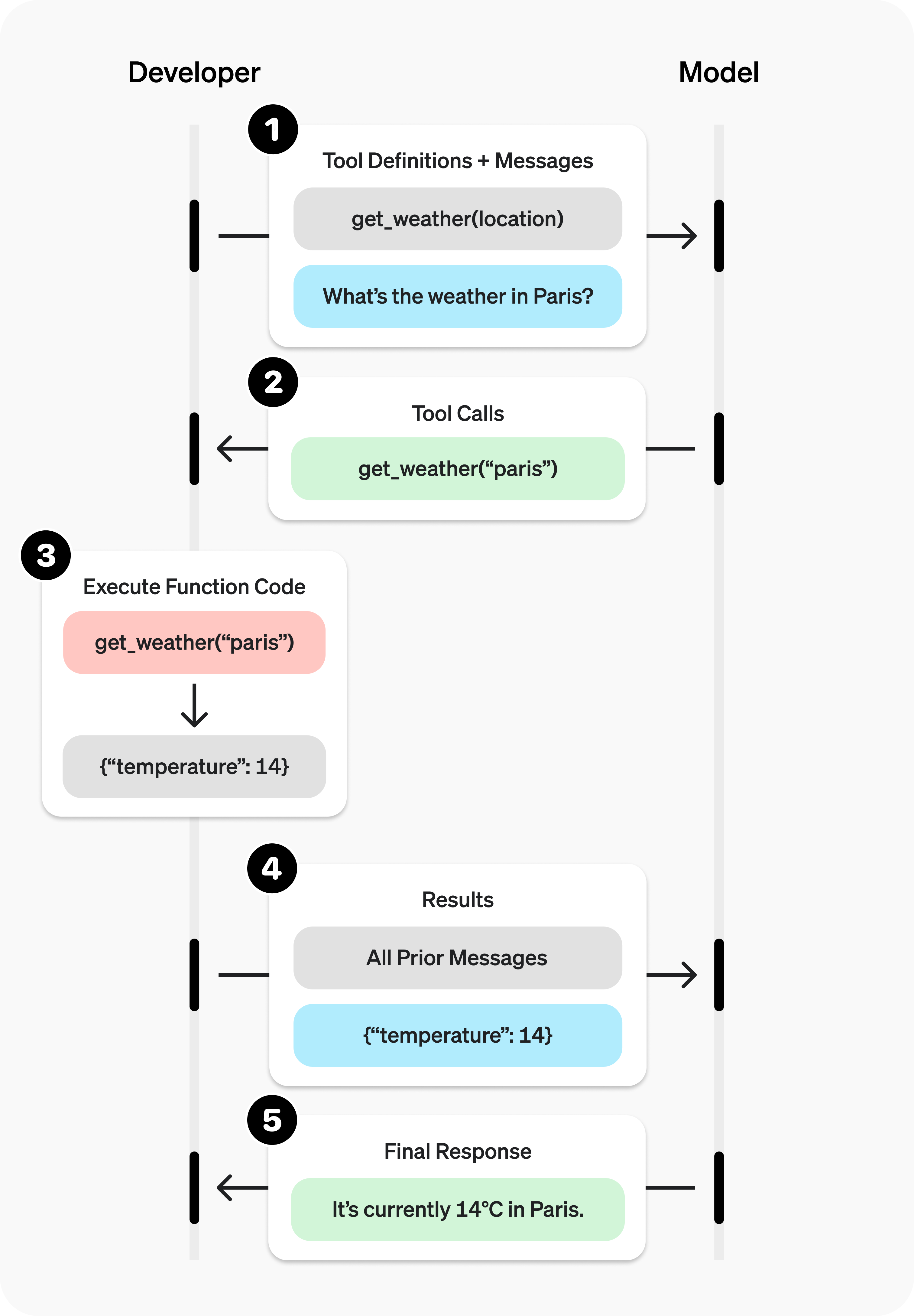
Siraya AI supports tool calling across multiple API protocols:
| API protocols | parameters |
|---|---|
| OpenAI Chat Completion API | Use the tools and tool_choice parameters |
| OpenAI Responses API (Beta) | Use the tools parameter; responses include the function_call type |
| Anthropic Messages API (Beta) | Use the tools parameter; tool definitions use input_schema |
Protocol comparison
| Feature | Chat Completion | Responses API | Anthropic Messages | Vertex AI |
|---|---|---|---|---|
| Tool parameter name | tools |
tools |
tools |
tools |
| Schema field | parameters |
parameters |
input_schema |
parameters |
| Tool call identifier | tool_calls |
function_call |
tool_use |
functionCall |
| Result field | tool role |
function_call_output |
tool_result |
functionResponse |
| Parallel calls | ✅ | ✅ | ✅ | ✅ |
| Forced calling | tool_choice |
tool_choice |
tool_choice |
functionCallingConfig |
| Strict mode | strict: true |
✅ | strict: true |
VALIDATED mode |
| Streaming support | ✅ | ✅ | ✅ | ✅ |
Supported Models: You can find models that support tool calling by filtering on https://siraya.ai/models?supported_parameters=tools

If you prefer to learn from a full end-to-end example, keep reading.
OpenAI Chat Completion API
Tool calling example
Let’s look at a complete tool calling flow, using get_horoscope to fetch a daily horoscope for a zodiac sign.
from openai import OpenAI
import json

client = OpenAI(
  base_url="https://llm.siraya.pro/v1",
  api_key="<API_KEY>",
)

# 1. Define the list of callable tools for the model
tools = [
    {
        "type": "function",
        "function": {
            "name": "get_horoscope",
            "description": "Get today's horoscope for a zodiac sign.",
            "parameters": {
                "type": "object",
                "properties": {
                    "sign": {
                        "type": "string",
                        "description": "Zodiac sign name, e.g., Taurus or Aquarius",
                    },
                },
                "required": ["sign"],
            },
        },
    },
]

# Create the message list; we'll append messages to it over time
input_list = [
    {"role": "user", "content": "How's my horoscope? I'm an Aquarius."}
]

# 2. Prompt the model with the defined tools
response = client.chat.completions.create(
    model="moonshotai/kimi-k2-0905",
    tools=tools,
    messages=input_list,
)

# Save the function call output for subsequent requests
function_call = None
function_call_arguments = None
input_list.append({
  "role": "assistant",
  "content": response.choices[0].message.content,
  "tool_calls": [tool_call.model_dump() for tool_call in response.choices[0].message.tool_calls] if response.choices[0].message.tool_calls else None,
})

for item in response.choices[0].message.tool_calls:
    if item.type == "function":
        function_call = item
        function_call_arguments = json.loads(item.function.arguments)

def get_horoscope(sign):
    return f"{sign}: Next Tuesday you'll meet a baby otter."

# 3. Execute the get_horoscope function logic
result = {"horoscope": get_horoscope(function_call_arguments["sign"])}

# 4. Provide the function call result to the model
input_list.append({
    "role": "tool",
    "tool_call_id": function_call.id,
    "name": function_call.function.name,
    "content": json.dumps(result),
})

print("Final input:")
print(json.dumps(input_list, indent=2, ensure_ascii=False))

response = client.chat.completions.create(
    model="moonshotai/kimi-k2-0905",
    tools=tools,
    messages=input_list,
)

# 5. The model should now be able to respond!
print("Final output:")
print(response.model_dump_json(indent=2))
print("\n" + response.choices[0].message.content)
import OpenAI from "openai";
const openai = new OpenAI({
  baseURL: 'https://llm.siraya.pro/v1',
  apiKey: '<API_KEY>',
});

// 1. Define the list of callable tools for the model
const tools: OpenAI.Chat.Completions.ChatCompletionTool[] = [
  {
    type: "function",
    function: {
      name: "get_horoscope",
      description: "Get today's horoscope for a zodiac sign.",
      parameters: {
        type: "object",
        properties: {
          sign: {
            type: "string",
            description: "Zodiac sign name, e.g., Taurus or Aquarius",
          },
        },
        required: ["sign"],
      },
    },
  },
];

// Create the message list; we'll append messages to it over time
let input: OpenAI.Chat.Completions.ChatCompletionMessageParam[] = [
  { role: "user", content: "How's my horoscope? I'm an Aquarius." },
];

async function main() {
  // 2. Use a model that supports tool calling
  let response = await openai.chat.completions.create({
    model: "moonshotai/kimi-k2-0905",
    tools,
    messages: input,
  });

  // Save the function call output for subsequent requests
  let functionCall: OpenAI.Chat.Completions.ChatCompletionMessageFunctionToolCall | undefined;
  let functionCallArguments: Record<string, string> | undefined;
  input = input.concat(response.choices.map((c) => c.message));

  response.choices.forEach((item) => {
    if (item.message.tool_calls && item.message.tool_calls.length > 0) {
      functionCall = item.message.tool_calls[0] as OpenAI.Chat.Completions.ChatCompletionMessageFunctionToolCall;
      functionCallArguments = JSON.parse(functionCall.function.arguments) as Record<string, string>;
    }
  });

  // 3. Execute the get_horoscope function logic
  function getHoroscope(sign: string) {
    return sign + " Next Tuesday you'll meet a baby otter.";
  }

  if (!functionCall || !functionCallArguments) {
    throw new Error("The model did not return a function call");
  }

  const result = { horoscope: getHoroscope(functionCallArguments.sign) };

  // 4. Provide the function call result to the model
  input.push({
    role: 'tool',
    tool_call_id: functionCall.id,
    // @ts-expect-error must have name
    name: functionCall.function.name,
    content: JSON.stringify(result),
  });
  console.log("Final input:");
  console.log(JSON.stringify(input, null, 2));

  response = await openai.chat.completions.create({
    model: "moonshotai/kimi-k2-0905",
    tools,
    messages: input,
  });

  // 5. The model should now be able to respond!
  console.log("Final output:");
  console.log(JSON.stringify(response.choices.map(v => v.message), null, 2));
}

main();
Defining a function tool (function)
Function tools can be configured via the tools parameter. A function tool is defined by its schema, which tells the model what the function does and what input parameters it expects. A function tool definition includes the following fields:
| Field | Description |
|---|---|
| type | Must always be function |
| function | The tool object |
| function.name | Function name (e.g., get_weather) |
| function.description | Detailed information on when and how to use the function |
| function.parameters | JSON Schema defining the function input parameters |
| function.strict | Whether to enable strict schema adherence when generating function calls |
Below is the definition for a get_weather function tool:
{
  "type": "function",
  "function": {
    "name": "get_weather",
    "description": "Retrieve the current weather for a given location.",
    "parameters": {
      "type": "object",
      "properties": {
        "location": {
          "type": "string",
          "description": "City and country, for example: Bogotá, Colombia"
        },
        "units": {
          "type": "string",
          "enum": ["celsius", "fahrenheit"],
          "description": "The unit for the returned temperature."
        }
      },
      "required": ["location", "units"],
      "additionalProperties": false
    },
    "strict": true
  }
}
Handling tool calls (Tool calling)
When the model calls a tool in tools, you must execute that tool and return the result. Since tool calling may include zero, one, or multiple calls, best practice is to assume there may be multiple.
Response format
When the model needs to call tools, the response finish_reason is "tool_calls", and message includes a tool_calls array:
{
  "id": "chatcmpl_xxx",
  "model": "openai/gpt-4.1-nano",
  "choices": [
    {
      "index": 0,
      "message": {
        "role": "assistant",
        "content": null,
        "tool_calls": [
          {
            "id": "call_abc123",
            "type": "function",
            "function": {
              "name": "get_weather",
              "arguments": "{\"location\":\"Beijing\"}"
            }
          }
        ]
      },
      "finish_reason": "tool_calls"
    }
  ]
}
Each call in the tool_calls array contains:
id: a unique identifier used when submitting the function result latertype: the tooltype, typicallyfunctionorcustomfunction: the function objectname: the function namearguments: JSON-encoded function arguments
Example tool_calls containing multiple tool calls:
[
  {
    "id": "fc_12345xyz",
    "type": "function",
    "function": {
      "name": "get_weather",
      "arguments": "{\"location\":\"Paris, France\"}"
    }
  },
  {
    "id": "fc_67890abc",
    "type": "function",
    "function": {
      "name": "get_weather",
      "arguments": "{\"location\":\"Bogotá, Colombia\"}"
    }
  },
  {
    "id": "fc_99999def",
    "type": "function",
    "function": {
      "name": "send_email",
      "arguments": "{\"to\":\"andrew@gettrust.ai\",\"body\":\"Hi Andrew\"}"
    }
  }
]
Execute tool calls and append results
for choice in response.choices:
    for tool_call in choice.message.tool_calls or []:
        if tool_call.type != "function":
            continue

        name = tool_call.function.name
        args = json.loads(tool_call.function.arguments)

        result = call_function(name, args)
        input_list.append({
            "role": "tool",
            "name": name,
            "tool_call_id": tool_call.id,
            "content": str(result)
        })
Controlling tool calling behavior (tool_choice)
By default, the model decides when and how many tools to call. You can control tool calling behavior using the tool_choice parameter.
- Auto: (default) Call zero, one, or multiple tools.
tool_choice: "auto" - Required: Call one or more tools.
tool_choice: "required"
When to use (allowed_tools)
If you want the model to use only a subset of the tool list in a given request—without modifying the tool list you pass in, to maximize prompt caching—you can configure allowed_tools.
"tool_choice": {
    "type": "allowed_tools",
    "mode": "auto",
    "tools": [
        { "type": "function", "function": { "name": "get_weather" } },
        { "type": "function", "function": { "name": "get_time" } }
    ]
}
You can also set tool_choice to "none" to force the model not to call any tools.
Streaming
Streaming tool calling is very similar to streaming normal responses: set stream to true and receive a stream of events.
from openai import OpenAI

client = OpenAI(
  base_url="https://llm.siraya.pro/v1",
  api_key="<API_KEY>",
)

tools = [{
    "type": "function",
    "function": {
        "name": "get_weather",
        "description": "Get the current temperature for a given location.",
        "parameters": {
            "type": "object",
            "properties": {
                "location": {
                    "type": "string",
                    "description": "City and country, e.g. Bogotá, Colombia"
                }
            },
            "required": [
                "location"
            ],
            "additionalProperties": False
        }
    }
}]

stream = client.chat.completions.create(
    model="moonshotai/kimi-k2-0905",
    messages=[{"role": "user", "content": "What's the weather like in Paris today?"}],
    tools=tools,
    stream=True
)

for event in stream:
    print(event.choices[0].delta.model_dump_json())
Output events
{"content":"","function_call":null,"refusal":null,"role":"assistant","tool_calls":null}
{"content":"I'll","function_call":null,"refusal":null,"role":"assistant","tool_calls":null}
{"content":" check","function_call":null,"refusal":null,"role":"assistant","tool_calls":null}
{"content":" the","function_call":null,"refusal":null,"role":"assistant","tool_calls":null}
{"content":" current","function_call":null,"refusal":null,"role":"assistant","tool_calls":null}
{"content":" weather","function_call":null,"refusal":null,"role":"assistant","tool_calls":null}
{"content":" in","function_call":null,"refusal":null,"role":"assistant","tool_calls":null}
{"content":" Paris","function_call":null,"refusal":null,"role":"assistant","tool_calls":null}
{"content":" for","function_call":null,"refusal":null,"role":"assistant","tool_calls":null}
{"content":" you","function_call":null,"refusal":null,"role":"assistant","tool_calls":null}
{"content":".","function_call":null,"refusal":null,"role":"assistant","tool_calls":null}
{"content":"","function_call":null,"refusal":null,"role":"assistant","tool_calls":[{"index":0,"id":"functions.get_weather:0","function":{"arguments":"{\"location\": \", France\"}","name":"get_weather"},"type":"function"}]}
When the model calls one or more tools, an event will be emitted for each tool call where tool_calls.type is not empty:
{
  "content": "",
  "role": "assistant",
  "tool_calls": [
    {
      "index": 0,
      "id": "get_weather:0",
      "function": { "arguments": "", "name": "get_weather" },
      "type": "function"
    }
  ]
}
Below is a snippet showing how to aggregate delta values into the final tool_call object.
Accumulate tool_call content
final_tool_calls = {}

for event in stream:
    delta = event.choices[0].delta
    if delta.tool_calls and len(delta.tool_calls) > 0:
        tool_call = delta.tool_calls[0]
        if tool_call.type == "function":
            final_tool_calls[tool_call.index] = tool_call
        else:
            final_tool_calls[tool_call.index].function.arguments += tool_call.function.arguments

print("Final tool calls:")
for index, tool_call in final_tool_calls.items():
    print(f"Tool Call {index}:")
    print(tool_call.model_dump_json(indent=2))
Accumulated final_tool_calls[0]