Trace - Cost and Performance
Overview
Siraya AI AI enables precise observability and cost analysis across AI Agent workflows by utilizing tracing fields such as trace-id, span-id, parent-id, and x-trace-tags. These fields allow Siraya AI AI to correlate requests, measure latency between modules, and compute the cost distribution of complex agent pipelines.
To activate distributed tracing, users must include the following fields in the API request header:
| Field name | Example value | Description |
|---|---|---|
trace-id |
4bf92f3577b34da6a3ce929d0e0e4736 |
A unique identifier for the entire call chain. Generated by the client or by the gateway. |
span-id |
00f067aa0ba902b7 |
A unique identifier for the current calling unit (API). A new |
parent-id |
e234acde0987def1 |
If the current API request was initiated by an upstream call, fill in the upstream span-id. The first request can be empty. |
x-trace-tags |
env=prod,version=2.3.1 |
Custom labels allow for expanded statistical dimensions. |
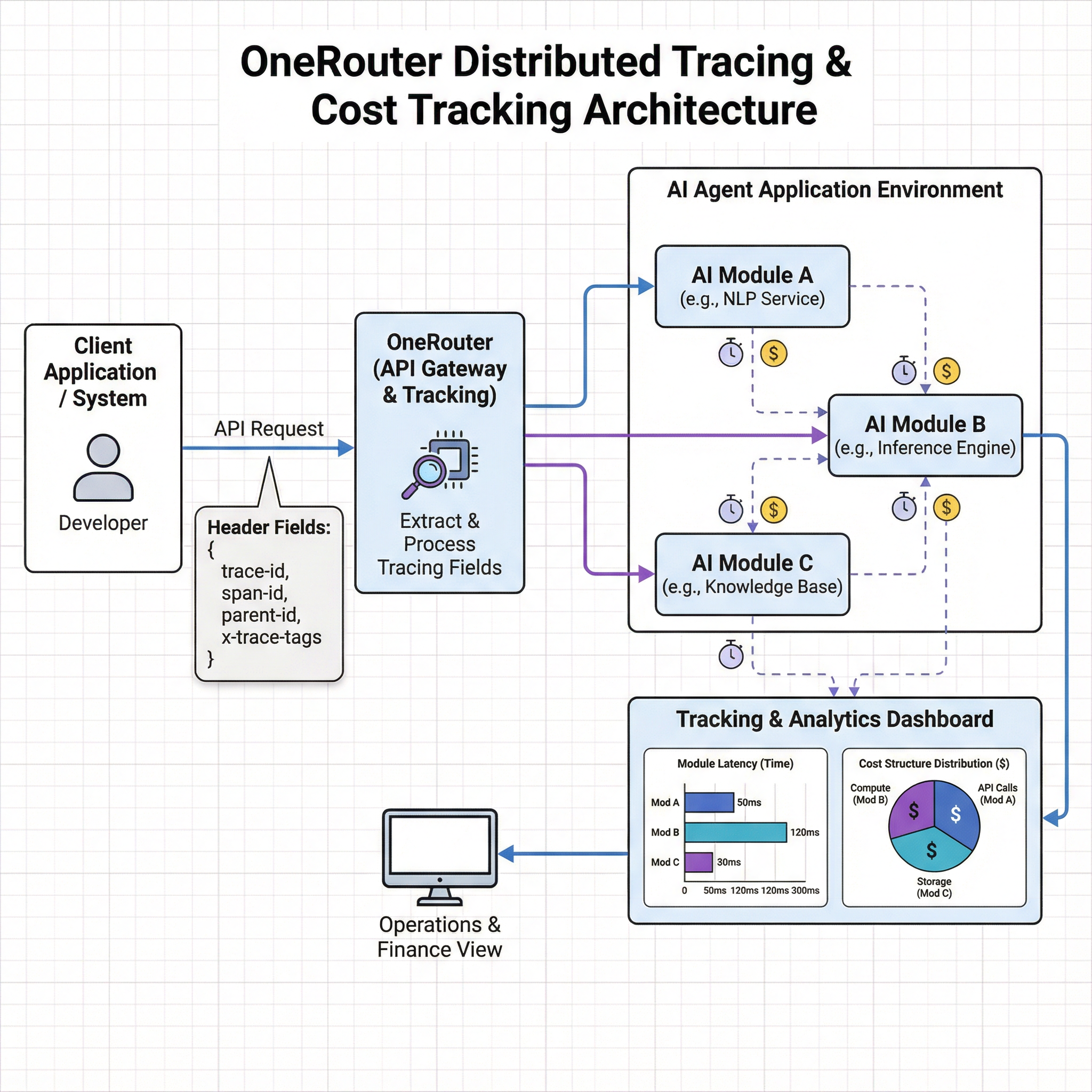
By providing these tracing headers, Siraya AI AI can:
- Reconstruct the complete execution topology of your AI Agent pipeline.
- Measure module-level latency and monitor inter-service dependencies.
- Attribute compute and token costs to each component for transparent cost analysis.
This approach gives developers full control over trace propagation and enables consistent observability across distributed AI systems.
Using the Siraya AI API directly
import requests
import json
import uuid

# Auto-generate tracing identifiers
trace_id = str(uuid.uuid4())
span_id = str(uuid.uuid4())[:8]
parent_id = "root"
trace_tags = "model=claude-3-5-sonnet@20240620,env=prod,region=us-east-1"

response = requests.post(
  url="https://llm.siraya.pro/v1/chat/completions",
  headers={
    "Authorization": "Bearer <API_KEY>",
    "Content-Type": "application/json",
    # Pass tracing headers
    "trace-id": trace_id,
    "span-id": span_id,
    "parent-id": parent_id,
    "x-trace-tags": trace_tags
  },
  data=json.dumps({
    "model": "claude-3-5-sonnet@20240620",
    "messages": [
      {
        "role": "user",
        "content": "What is the meaning of life?"
      }
    ]
  })
)

print(response.json()["choices"][0]["message"]["content"])