Claude Code Integration Guide
What's Claude Code
Claude Code is an AI-powered coding assistance published by Anthropic that provides a terminal interface, allowing developers to delegate complex programming tasks directly from the terminal to Claude Code for completion.
What's SIRAYA Model Router General Conversion Layer
SIRAYA Model Router General Conversion Layer lets you run the Claude Agent SDK against any model in SIRAYA Model Router—without changing your agent logic.
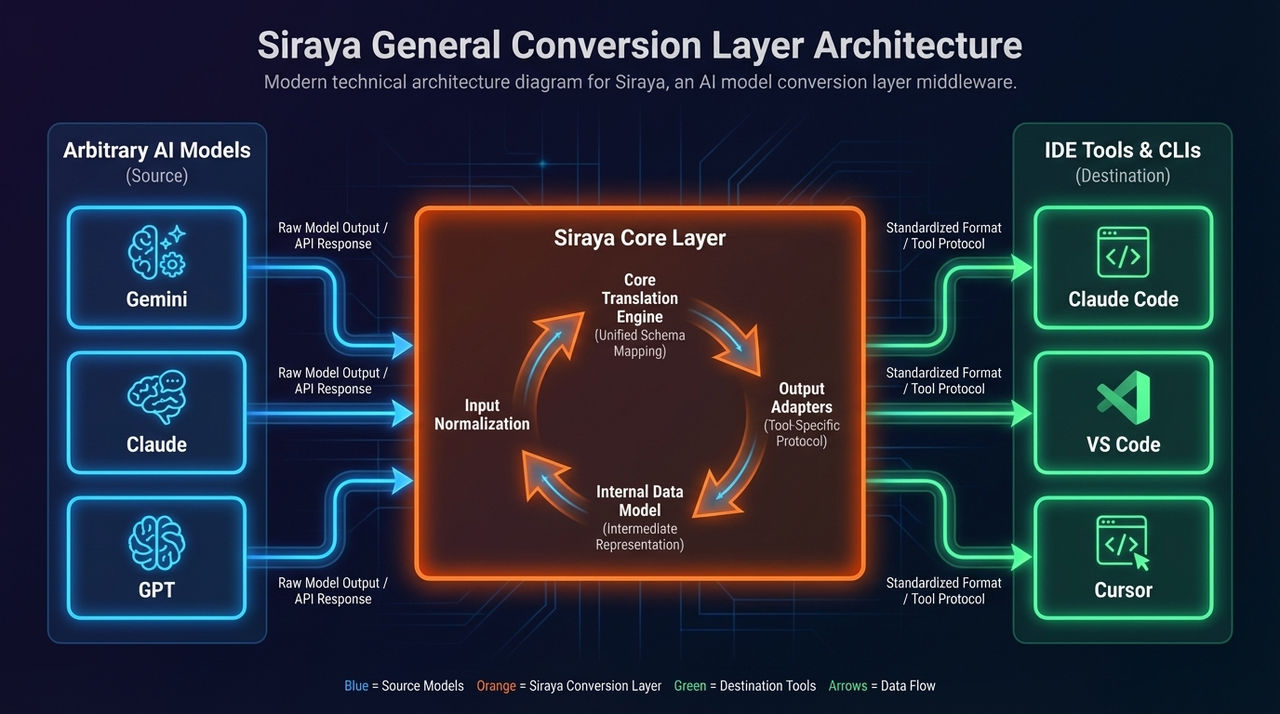
With the SIRAYA Model Router General Conversion Layer, developers can keep using the same SDK APIs. The conversion layer translates Anthropic-style Messages requests to whichever upstream (Anthropic、OpenAI or other models in SIRAYA Model Router) matches the model string you provide.
What We Help You Achieve
With SIRAYA Model Router, developers can seamlessly integrate and utilize a wide range of AI model combinations. Through SIRAYA Model Router, you can use Claude code powered by different underlying model engines, including:
- Gemini 2.5 models as the core runtime for executing Claude code;
- GPT series models as the core runtime for executing Claude code;
- The full series of Claude models as the native core for executing Claude code.
This flexible architecture allows SIRAYA Model Router to unify multiple large language model ecosystems under a single interface, enabling developers to switch, combine, or optimize model performance for diverse code execution and reasoning scenarios.
Quick Start
Now, SIRAYA Model Router provides Anthropic SDK compatible LLM API services, enabling you to easily use SIRAYA Model Router LLM models in Claude Code to complete tasks. Please refer to the guide below to complete the integration process.
1. Setup your SIRAYA Model Router account & api keys
The first step to start using SIRAYA Model Router is to create an account and get your API key.
2. Install Claude Code
To install Claude Code on macOS, Linux or WSL, run the native installer:
For Windows and other install methods (Homebrew, WinGet, apt, dnf, apk), see the Claude Code setup guide.
Info
You can also install Claude Code with npm: npm install -g @anthropic-ai/claude-code. The npm package requires Node.js 22 or later.
3. Setup the Claude Code configuration
Open the terminal and set up environment variables as follows:
# Set the Anthropic SDK compatible API endpoint provided by SIRAYA Model Router.
export ANTHROPIC_BASE_URL="https://llm.siraya.ai"
export ANTHROPIC_AUTH_TOKEN="<API_KEY>"

# Set the model provided by SIRAYA Model Router.
export ANTHROPIC_MODEL="claude-sonnet-4.5"

# Map Claude Code's built-in model tiers (Haiku / Sonnet / Opus) to SIRAYA models.
export ANTHROPIC_DEFAULT_HAIKU_MODEL="claude-haiku-4.5"
export ANTHROPIC_DEFAULT_SONNET_MODEL="claude-sonnet-4.5"
export ANTHROPIC_DEFAULT_OPUS_MODEL="claude-opus-4.8"

# Disable non-essential background traffic when routing through SIRAYA.
export CLAUDE_CODE_DISABLE_NONESSENTIAL_TRAFFIC="1"
Persist this in settings.json
Instead of exporting on every shell, you can set the same values in
~/.claude/settings.json under env:
{
  "env": {
    "ANTHROPIC_BASE_URL": "https://llm.siraya.ai",
    "ANTHROPIC_AUTH_TOKEN": "<API_KEY>",
    "ANTHROPIC_MODEL": "claude-sonnet-4.5",
    "ANTHROPIC_DEFAULT_HAIKU_MODEL": "claude-haiku-4.5",
    "ANTHROPIC_DEFAULT_SONNET_MODEL": "claude-sonnet-4.5",
    "ANTHROPIC_DEFAULT_OPUS_MODEL": "claude-opus-4.8",
    "CLAUDE_CODE_DISABLE_NONESSENTIAL_TRAFFIC": "1"
  }
}
ANTHROPIC_DEFAULT_{HAIKU,SONNET,OPUS}_MODELmap Claude Code's built-in tier references to specific SIRAYA models, so background tasks (titles, summaries) and model-tier switches resolve correctly through the router.CLAUDE_CODE_DISABLE_NONESSENTIAL_TRAFFIC=1turns off telemetry and other non-essential background requests — recommended when using a non-Anthropic endpoint.
4. Start your first session
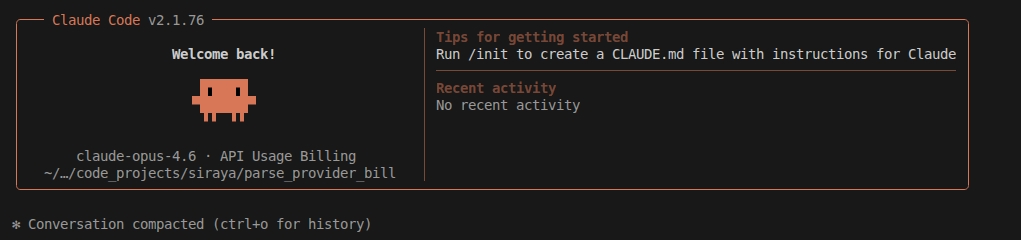
Next, navigate to your project directory and start Claude Code. You will see the Claude Code prompt inside a new interactive session:
Common Commands
| Command | Description | Example |
|---|---|---|
claude |
Start interactive mode | claude |
claude "task description" |
Run a one-time task | claude "fix the build error" |
claude -p "query" |
Run one-off query, then exit | claude -p "explain this function" |
claude -c |
Continue most recent conversation | claude -c |
claude -r |
Resume a previous conversation | claude -r |
/clear |
Clear conversation history | > /clear |
/help |
View available commands | > /help |
exit or Ctrl+C |
Exit Claude Code | > exit |