Billing Logs
Cost Breakdown
The Logs page provides users with comprehensive API call history and detailed billing information, enabling you to fully understand the resource consumption and actual costs incurred for each API call.
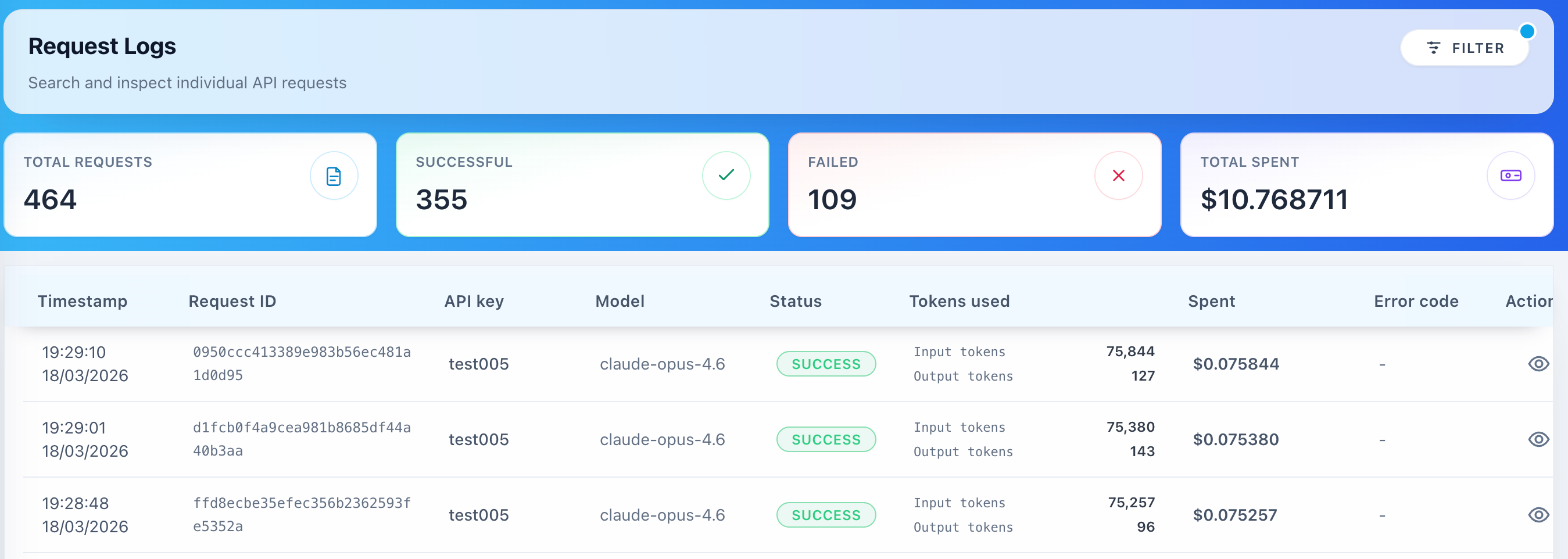
Each call record contains the following detailed information:
Basic Information
- Call Time: Timestamp accurate to milliseconds
- Request ID: Unique identifier for issue tracking
- Model Name: Specific model version used
- Call Status: Status information including success/failure/timeout
Token Usage Statistics
- Input Tokens: Number of tokens in the input prompt
- Output Tokens: Number of tokens generated by the model
- Total Tokens: Total token consumption
- Cached Tokens: Number of tokens served from cache
Price Display
Each record shows how the amount charged was reached:
1. List Price
- Cost calculated from the model's published price on the Models page
- Excludes any customer-specific discount
- Serves as the baseline reference for cost calculation
2. Discounted Price
- Price after applying a discount agreed for your account, if you have one
- Discounts are negotiated individually with SIRAYA; there is no public discount schedule
- Equals the list price when no discount applies
Cost Calculation Explanation
List Cost = Input Cost + Cache Read Cost + Cache Write Cost + Output Cost

Where:
- Input Cost       = non-cached Input Tokens × model input price
- Cache Read Cost  = Cached Tokens × model cache-read price
- Cache Write Cost = Cache-write Tokens × model cache-write price
- Output Cost      = Output Tokens × model output price

Final Cost = List Cost, after any discount agreed for your account
Cached input tokens are billed at the model's cache-read price, not at the normal input price. See Billing Transparency for the full formulas.
Additional Features
Export & Reporting
- CSV Export: Download detailed logs for external analysis
- Custom Reports: Generate reports for specific time periods or usage patterns
- API Integration: Request-level usage and billed cost through the External Console API
Real-time Monitoring
- Live Updates: Real-time refresh of call records
- Alert System: Notifications for unusual spending patterns or errors
- Dashboard Integration: Quick access to key metrics and trends